Prerequisites
- React Native project with the New Architecture enabled (default since React Native 0.76). Both bare React Native (CLI) and Expo (prebuild / development client) projects are supported.
- Minimum iOS deployment target 15.1 and Android
minSdkVersion24. - Enable AndroidX in your project. For more information.
- Application Id provided in Admost Mediation Dashboard.
- Zone Id(s) provided in Admost Mediation Dashboard.
For testing you can use following Ids;
IOS Test Ids
Application Id: "15066ddc-9c18-492c-8185-bea7e4c7f88c"
Banner Zone Id: "b4009772-de04-42c4-bbaa-c18da9e4a1ab"
Interstitial Zone Id: "39f74377-5682-436a-9338-9d1c4df410bd"
RewardedVideo Zone Id: "2bdefd44-5269-4cbc-b93a-373b74a2f067"
Android Test Ids
Application Id: "6cc8e89a-b52a-4e9a-bb8c-579f7ec538fe"
Banner Zone Id: "9fb970db-7d96-4ef2-ac8c-d88ec22270ff"
Interstitial Zone Id: "f99e409b-f9ab-4a2e-aa9a-4d143e6809ae"
RewardedVideo Zone Id: "88cfcfd0-2f8c-4aba-9f36-cc0ac99ab140"
Setup
AMR React Native bridge is published on npm as mediation.rn. It is built on the React Native New Architecture (TurboModule) and is autolinked; no manual native linking is required.
Install the package in the root directory of your project:
npm install mediation.rnNote The package contains native code, so it does not run in Expo Go. Use npx expo run:android / npx expo run:ios, a development client or EAS Build.
AMR SDK itself (AMRSDK pod on iOS, com.admost.sdk:amr on Android) and the AdMob adapter are added by the package automatically. You only need to add the additional ad network adapters you want to use. Please refer to following table for required and optional packages for your target.
| Status | Name | Download Links | |
|---|---|---|---|
IOS Setup Notes
Required Files
With your selections you are going to work with following files;
PodfileInfo.plist
-
CocoaPods is a dependency manager for Swift and Objective-C Cocoa projects which automates and simplifies the process of using 3rd-party libraries like AMR in your projects. See getting started guide for more information on installing cocoapods.
Edit Files
mediation.rn requires the New Architecture. It is enabled by default since React Native 0.76. If you are on an older version, run pod install with RCT_NEW_ARCH_ENABLED=1.
Since we use use_frameworks! you should disable Flipper in your Podfile if your template still contains it (React Native 0.73 and below).
# Note that if you have use_frameworks! enabled, Flipper will not work and
# you should disable the next line.
#:flipper_configuration => FlipperConfiguration.enabled,
At least one mediation adapter is required for AMRSDK to show ads. You can add all adapters (recommended for maximized revenue) or start with a subset of adapters. Consult your AMR agent for further details.
Please select the ad networks you want to install from the list above.
Podfile will be updated while you are choosing networks.
To integrate the mediation adapters into your React Native project using CocoaPods, add the selected pods to
your Podfile. AMRSDK is already a dependency of mediation.rn, you do not need to add it manually.
PLEASE SELECT ONE OR MORE NETWORKS TO CREATE YOUR PODPSPEC DEPENDENCY LIST.
Then simply go to root directory of your project in terminal and run
cd iospod installIf you are using Expo, run npx expo prebuild instead; it generates the iOS project and installs the pods.
Add following lines to your plist file.
<key>NSCalendarsUsageDescription</key>
<string>Some ad content may access calendar</string>
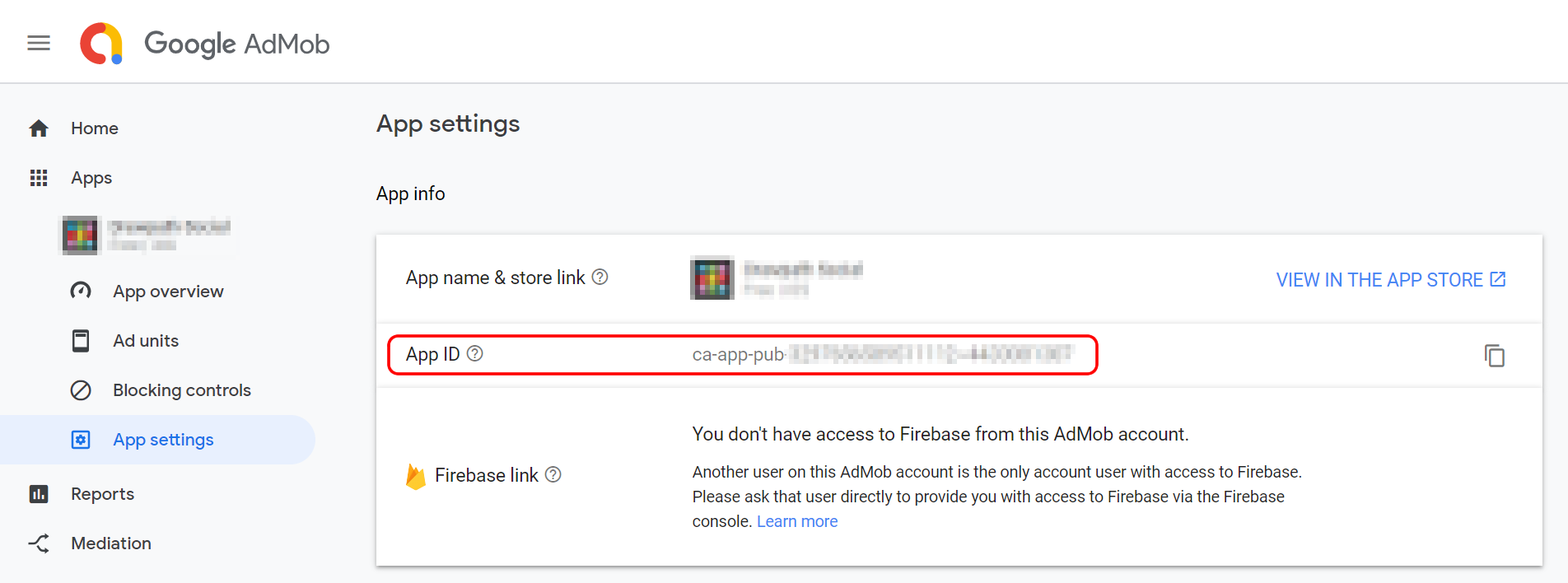
Important If you are using AdMob you must add your AdMob App ID to your plist file with GADApplicationIdentifier key as shown below.
(Replace ca-app-pub-XXXXXXXXXXXXXXXX~XXXXXXXXXX with your own App ID)
<key>GADApplicationIdentifier</key>
<string>ca-app-pub-XXXXXXXXXXXXXXXX~XXXXXXXXXX</string>
Your App ID can be found on AdMob dashboard -> Apps -> App settings -> App info.
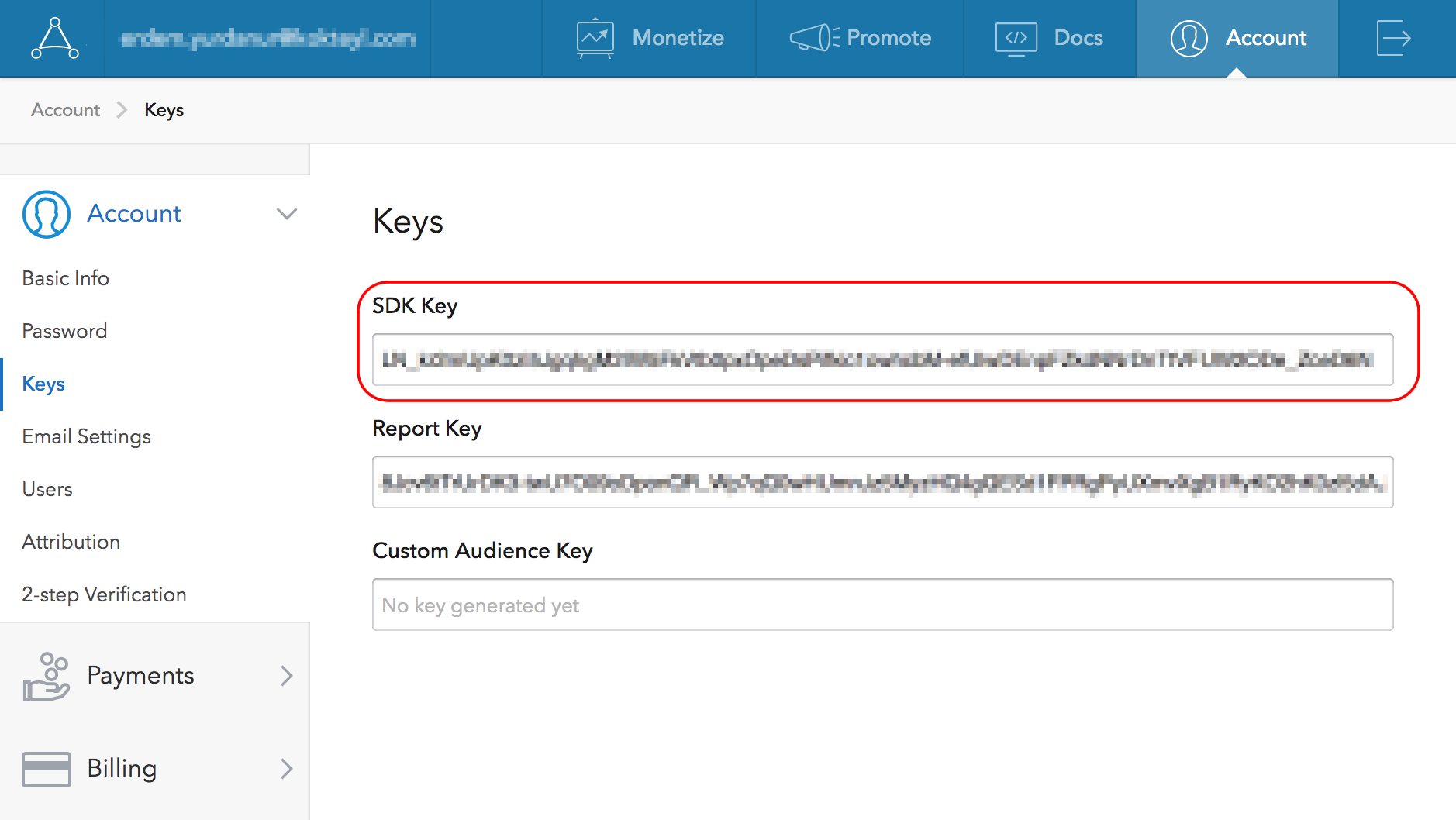
Important If you are using AppLovin you must add AppLovin SDK Key to your plist file with AppLovinSdkKey key as shown below.
(Replace XXXXXXXXXXXXXXX with your own AppLovin SDK Key)
<key>AppLovinSdkKey</key>
<string>XXXXXXXXXXXXXXX</string>
Your AppLovin SDK Key can be found on AppLovin Dashboard -> Account -> Keys.
Important If you are using Appsamurai or YouAppi you must set Always Embed Swift Libraries value YES.
Important If you are using Pollfish you must update and add Pollfish Policy to your privacy policy file.
Optional If you are using AdColony you need to add following code to your plist file.
<key>LSApplicationQueriesSchemes</key>
<array>
    <string>fb</string>
    <string>instagram</string>
    <string>tumblr</string>
    <string>twitter</string>
</array>
SKAdNetwork
With the iOS 14, you need to add SKAdNetwork ids to your Info.plist file to support conversion tracking.
Add following code to your Info.plist file:
PLEASE SELECT ONE OR MORE NETWORKS TO CREATE YOUR SKADNETWORK LIST.iOS 14
Starting with iOS 14, apps will be required to ask users for permission to access IDFA. In order to ask for this permission and display the App Tracking Transparency authorization request for accessing the IDFA, you will need to add NSUserTrackingUsageDescription key to Info.plist file.
<key>NSUserTrackingUsageDescription</key>
<string>Your awesome message to encourage user to give permission to access IDFA</string>
mediation.rn calls requestTrackingAuthorization for you inside Admost.start() and passes the result to AMR SDK, so adding the key above is enough. User is prompted with following popup on the first start() call.
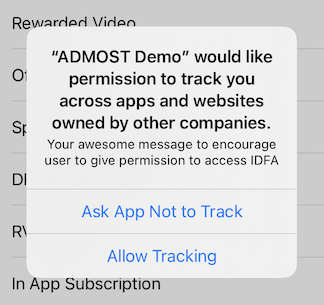
Please see ATTrackingManager.AuthorizationStatus for possible return values.
Android Setup Notes
Required Files
With your selections you are going to work with following files;
build.gradlesettings.gradleapp/build.gradlegradle.propertiesAndroidManifest.xml
Edit Files
mediation.rn is autolinked and requires the New Architecture. Make sure the following line exists in your gradle.properties file (it is the default since React Native 0.76):
newArchEnabled=true
Add the maven repositories below to the repositories block of your project. Depending on your React Native version this is either the “allprojects” block of the top-level build.gradle or the dependencyResolutionManagement block of settings.gradle. Be sure to add it above other maven repositories:
Note If Gradle cannot resolve com.admost.sdk:amr during the build, add maven { url "https://mvn-repo.admost.com/artifactory/amr-2" } to the repositories block of your application as shown above. Repositories declared inside the package are ignored when your project uses FAIL_ON_PROJECT_REPOS / PREFER_SETTINGS in settings.gradle.
AMR SDK and the AdMob adapter are already dependencies of mediation.rn. Add the following lines for the additional networks you selected inside dependencies{} bracelets in /app/build.gradle file
It is highly recommended to enable AndroidX in your project. Editing gradle.properties file and adding the lines below(if they are not present) is required for most ad-network sdks.
android.useAndroidX=true
android.enableJetifier=true
Important If you are using Admob SDK (com.google.android.gms:play-services-ads) with version
17.0.0 and higher, you must add your AdMob App ID to your Android Manifest
file.
<manifest>
    <application>
        <!-- Sample AdMob App ID: ca-app-pub-0000000000000000~0000000000 -->
        <meta-data
            android:name="com.google.android.gms.ads.APPLICATION_ID"
            android:value="[ADMOB_APP_ID]"/>
    </application>
</manifest>
Your App ID can be found on AdMob dashboard -> Apps -> App settings -> App info.
Important If you are using AppLovin you must add AppLovin SDK Key to your Android Manifest file as shown below.
<manifest>
    <application>
        <meta-data
            android:name="applovin.sdk.key"
            android:value="YOUR_SDK_KEY_FROM_APPLOVIN"/>
    </application>
</manifest>
Your AppLovin SDK Key can be found on AppLovin Dashboard -> Account -> Keys.
Proguard
If you are using proguard. Copy & paste following code snippet in to your /app/src/proguard-rules.pro file
# ADMOST
-keepattributes Exceptions, InnerClasses
-dontwarn admost.sdk.**
-keep class admost.sdk.** {*;}
-dontwarn com.amr.unity.**
-keep class com.amr.unity.** {*;}
-dontwarn admost.adserver.**
-keep class com.adjust.sdk.** {*;}
-dontwarn com.adjust.sdk.**
-keep class com.appsflyer.** {*;}
-dontwarn com.appsflyer.**
-keep class admost.adserver.** { *; }
-dontwarn com.google.android.exoplayer2.**
-keep class com.google.android.exoplayer2.**{ *;}
-keep class android.support.v4.app.DialogFragment { *; }
-keep class android.support.v4.util.LruCache { *; }


# VOLLEY
-keep class com.android.volley.** { *; }
-keep interface com.android.volley.** { *; }
-keep class org.apache.commons.logging.**

# # # # # # # # # # # # # # # # # # # # # # # # # # # # # # # # # # # # # # # # # # # # # # # # # #

# ADCOLONY
-dontwarn com.adcolony.**
-keep class com.adcolony.** { *; }
-keepclassmembers class * { @android.webkit.JavascriptInterface <methods>; }
-keepclassmembers class com.adcolony.sdk.ADCNative** { *; }

# ADGEM
-keep class com.adgem.** { *; }
-dontwarn com.adgem.**

# ADMOB / ADX / GOOGLE
-keep class com.android.vending.billing.**
-keep public class com.google.android.gms.ads.** { public *; }
-keep public class com.google.ads.** { public *; }
-keep class com.google.android.gms.** { *; }
-dontwarn com.google.android.gms.**
-keep public class com.google.android.gms.common.internal.safeparcel.SafeParcelable { public static final *** NULL; }
-keepnames class * implements android.os.Parcelable
-keepclassmembers class * implements android.os.Parcelable { public static final *** CREATOR; }
-keep @interface android.support.annotation.Keep
-keep @android.support.annotation.Keep class *
-keepclasseswithmembers class * { @android.support.annotation.Keep <fields>; }
-keepclasseswithmembers class * { @android.support.annotation.Keep <methods>; }
-keep @interface com.google.android.gms.common.annotation.KeepName
-keepnames @com.google.android.gms.common.annotation.KeepName class *
-keepclassmembernames class * { @com.google.android.gms.common.annotation.KeepName *; }
-keep @interface com.google.android.gms.common.util.DynamiteApi
-keep public @com.google.android.gms.common.util.DynamiteApi class * { public <fields>; public <methods>; }
-keep public @com.google.android.gms.common.util.DynamiteApi class * { *; }
-keep class com.google.android.apps.common.proguard.UsedBy*
-keep @com.google.android.apps.common.proguard.UsedBy* class *
-keepclassmembers class * { @com.google.android.apps.common.proguard.UsedBy* *; }
-dontwarn android.security.NetworkSecurityPolicy
-dontwarn android.app.Notification

#ADTIMING
-dontwarn com.aiming.mdt.**.*
-dontoptimize
-dontskipnonpubliclibraryclasses
-keepattributes *Annotation*
#adt
-keep class com.aiming.mdt.**{ *; }
-keepattributes *Annotation*,InnerClasses
-keepnames class * implements android.os.Parcelable {
public static final ** CREATOR;
}
#R
-keepclassmembers class **.R$* {
public static <fields>;
}

# AMAZON
-dontwarn com.amazon.**
-keep class com.amazon.** { *; }
-dontwarn org.apache.http.**
-keepattributes *Annotation*

# APPLOVIN
-dontwarn com.applovin.**
-keep class com.applovin.** { *; }

# APPNEXT
-keep class com.appnext.** { *; }
-dontwarn com.appnext.**

# APPSAMURAI
-keepclassmembers,allowobfuscation class * {
    @com.google.gson.annotations.SerializedName <fields>;
}

# AVOCARROT - GLISPA
-keep class com.avocarrot.** { *; }
-dontwarn com.avocarrot.**
-keep class com.google.android.exoplayer2.SimpleExoPlayer
-dontwarn com.google.android.exoplayer2.SimpleExoPlayer

# CHARTBOOST
-dontwarn org.apache.http.**
-dontwarn com.chartboost.sdk.impl.**
-keep class com.chartboost.sdk.** { *; }
-keepattributes *Annotation*

# CRITEO
-dontwarn com.criteo.**
-keep class com.criteo.** { *; }

# DISPLAYIO
-keep class io.display.sdk.** { *; }
-dontwarn io.display.sdk.**
-keep class com.brandio.ads.** { *;}
-dontwarn com.brandio.ads.**

# FACEBOOK
-dontwarn com.facebook.ads.**
-dontnote com.facebook.ads.**
-keep class com.facebook.** { *; }
-keepattributes Signature
-keep class com.google.android.exoplayer2.** {*;}
-dontwarn com.google.android.exoplayer2.**

# FLURRY
-keep class com.flurry.** { *; }
-dontwarn com.flurry.**
-keepattributes *Annotation*,EnclosingMethod,Signature
-keepclasseswithmembers class * { public <init>(android.content.Context, android.util.AttributeSet, int); }
-keep class * extends java.util.ListResourceBundle { protected Object[][] getContents(); }
-keep public class com.google.android.gms.common.internal.safeparcel.SafeParcelable { public static final *** NULL; }
-keepnames @com.google.android.gms.common.annotation.KeepName class *
-keepclassmembernames class * { @com.google.android.gms.common.annotation.KeepName *; }
-keepnames class * implements android.os.Parcelable { public static final ** CREATOR; }

# FREECORP
-keep class com.fly.** { *; }
-dontwarn com.fly.**

# FYBER
-keep class com.fyber.** { *; }
-dontwarn com.fyber.**
-keep class com.fyber.mediation.MediationConfigProvider { public static *; }
-keep class com.fyber.mediation.MediationAdapterStarter { public static *; }
-keepclassmembers class com.fyber.ads.videos.mediation.** { void setValue(java.lang.String); }

# HUAWEI-ADS
-keep class com.huawei.openalliance.ad.** { *; }
-keep class com.huawei.hms.ads.** { *; }

# INMOBI
-keepattributes SourceFile,LineNumberTable
-keep class com.inmobi.** {*;}
-dontwarn com.inmobi.**
-keep public class com.google.android.gms.**
-dontwarn com.google.android.gms.**
-dontwarn com.squareup.picasso.**
-keep class com.google.android.gms.ads.identifier.AdvertisingIdClient{public *;}
-keep class com.google.android.gms.ads.identifier.AdvertisingIdClient$Info{public *;}
-keep class com.squareup.picasso.** {*;}
-dontwarn com.squareup.picasso.**
-dontwarn com.squareup.okhttp.**
-keep class com.moat.** {*;}
-dontwarn com.moat.**
-keep class com.integralads.avid.library.* {*;}


# INNERACTIVE
-dontwarn com.fyber.**
-keep class com.fyber.** {*;}
-dontwarn com.inneractive.api.ads.**
-keep class com.inneractive.api.ads.** {*;}
-keepclassmembers class com.inneractive.api.ads.** {*;}
-keepclassmembers class com.inneractive.api.ads.sdk.nativead.** {*;}
-keepattributes Signature
-keepattributes *Annotation*
-keep class sun.misc.Unsafe { *; }
-keep class com.google.gson.stream.** { *; }
-keep class com.google.gson.examples.android.model.** { *; }
-keep class com.google.gson.Gson { *; }
-keep class com.google.gson.GsonBuilder { *; }
-keep class com.google.gson.FieldNamingStrategy { *; }

# IRONSOURCE
-dontwarn com.ironsource.**
-keep class com.ironsource.** { *; }
-keepclassmembers class * implements android.os.Parcelable { public static final android.os.Parcelable$Creator *; }
-keep public class com.google.android.gms.ads.** { public *; }
-keep class com.ironsource.adapters.** { *; }
-dontwarn com.moat.**
-keep class com.moat.** { public protected private *; }

# LOOPME
-dontwarn com.loopme.**
-keep class com.loopme.** { *; }

# MEDIABRIX
-keep class com.mediabrix.** { *; }
-keep class com.moat.** { *; }
-keep class mdos.** { *; }
-dontwarn com.mediabrix.**
-dontwarn com.moat.**
-dontwarn mdos.**

# MILLENNIAL & NEXAGE
-keep class com.millennialmedia.** { *; }
-dontwarn com.millennialmedia.**

# MINTEGRAL
-keepattributes Signature
-keepattributes *Annotation*
-keep class com.mbridge.** {*; }
-keep interface com.mbridge.** {*; }
-keep interface androidx.** { *; }
-keep class androidx.** { *; }
-keep public class * extends androidx.** { *; }
-dontwarn com.mbridge.**
-keep class **.R$* { public static final int mbridge*; }

# MOBFOX
-dontwarn com.mobfox.**
-keep class com.mobfox.** { *; }
-keep class com.mobfox.adapter.** { *; }
-keep class com.mobfox.sdk.** { *; }

# MOPUB
-keepclassmembers class com.mopub.** { public *; }
-dontnote com.mopub.**
-dontwarn com.mopub.**
-keep public class com.mopub.**
-keep class com.mopub.mobileads.** { *; }
-keep class * extends com.mopub.mobileads.CustomEventBanner {}
-keep class * extends com.mopub.mobileads.CustomEventInterstitial {}
-keep class * extends com.mopub.nativeads.CustomEventNative {}
-keep class * extends com.mopub.nativeads.CustomEventRewardedAd {}
-keepclassmembers class ** { @com.mopub.common.util.ReflectionTarget *; }
-keepclassmembers class com.integralads.avid.library.mopub.** { public *; }
-keep public class com.integralads.avid.library.mopub.**
-keepclassmembers class com.moat.analytics.mobile.mpub.** { public *; }
-keep public class com.moat.analytics.mobile.mpub.**
-keep class com.google.android.gms.common.GooglePlayServicesUtil { *; }
-keep class com.google.android.gms.ads.identifier.AdvertisingIdClient { *; }
-keep class com.google.android.gms.ads.identifier.AdvertisingIdClient$Info { *; }
-keep class * extends java.util.ListResourceBundle { protected Object[][] getContents(); }
-keep public class com.google.android.gms.common.internal.safeparcel.SafeParcelable { public static final *** NULL; }
-keepnames @com.google.android.gms.common.annotation.KeepName class *
-keepclassmembernames class * { @com.google.android.gms.common.annotation.KeepName *; }
-keepnames class * implements android.os.Parcelable { public static final ** CREATOR; }
-keep public class android.webkit.JavascriptInterface {}

# MYTARGET
-keep class com.my.target.** {*;}

# NEND
-keep class net.nend.android.** { *; }
-dontwarn net.nend.android.**

# NATIVEX
-dontwarn com.nativex.**
-keep class com.nativex.** { *; }

# OGURY
-dontwarn com.ogury.**
-keep class com.ogury.** { *; }

# OUTBID
-dontwarn outbid.com.outbidsdk.**
-keep class outbid.com.outbidsdk.** { *; }

# QUMPARA
-dontwarn com.qumpara.analytics.**
-keep class com.qumpara.analytics.** { *; }
-dontwarn com.qumpara.offerwall.sdk.**
-keep class com.qumpara.offerwall.sdk.** { *; }

#POLLFISH
-dontwarn com.pollfish.**
-keep class com.pollfish.** { *; }

# PUBNATIVE
-keepattributes Signature
-keep class net.pubnative.** { *; }
-dontwarn net.pubnative.**
-keep class com.squareup.picasso.** { *; }
-dontwarn com.squareup.picasso.**

# REVMOB
-dontwarn rm.com.android.sdk.**
-keep class rm.com.android.sdk.** { public *; }

# RETROFIT
-dontwarn retrofit2.**
-keep class retrofit2.** { *; }
-keepattributes Signature
-keepattributes Exceptions
-keepclasseswithmembers class * {
    @retrofit2.http.* <methods>;
}

# SMAATO
-dontwarn com.smaato.**
-keep class com.smaato.** { public *; }
-assumenosideeffects class android.util.Log {
    public static *** d(...);
    public static *** v(...);
    public static *** i(...);
}
-keep public class com.smaato.soma.internal.connector.OrmmaBridge { public *; }
-keepattributes *Annotation*
-dontwarn com.smaato.soma.SomaUnityPlugin*
-dontwarn com.millennialmedia**
-dontwarn com.facebook.**

# SMARTAD
-keep class com.smartadserver.** { *; }
-dontwarn com.smartadserver.**


# STARTAPP
-keepattributes Exceptions, InnerClasses, Signature, Deprecated, SourceFile, LineNumberTable, *Annotation*, EnclosingMethod
-dontwarn android.webkit.JavascriptInterface
-keep class com.startapp.** { *; }
-dontwarn com.startapp.**

# TAPJOY
-keep class com.tapjoy.** {*;}
-keep class com.moat.** {*;}
-keepattributes JavascriptInterface
-keepattributes *Annotation*
-keep class * extends java.util.ListResourceBundle {protected Object[][] getContents();}
-keep public class com.google.android.gms.common.internal.safeparcel.SafeParcelable {public static final *** NULL;}
-keepnames @com.google.android.gms.common.annotation.KeepName class *
-keepclassmembernames class * {@com.google.android.gms.common.annotation.KeepName *;}
-keepnames class * implements android.os.Parcelable {public static final ** CREATOR;}
-keep class com.google.android.gms.ads.identifier.** {*;}
-dontwarn com.tapjoy.**

# TAPPX
-keepattributes *Annotation*
-keepclassmembers class com.google.**.R$* { public static <fields>; }
-keep public class com.google.ads.** {*;}
-keep public class com.google.android.gms.** {*;}
-keep public class com.tappx.** { *; }
-dontwarn com.tappx.**

#TIKTOK
-keep class com.bytedance.sdk.openadsdk.** { *; }
-keep public interface com.bytedance.sdk.openadsdk.downloadnew.** {*;}
-keep class com.pgl.sys.ces.** {*;}
-keep class com.bytedance.embed_dr.** {*;}
-keep class com.bytedance.embedapplog.** {*;}

# UNITY
-dontwarn com.unity3d.**
-keep class com.unity3d.ads.** { *; }

# Vungle
-dontwarn com.vungle.**
-dontnote com.vungle.**
-keep class com.vungle.** { *; }
-dontwarn com.vungle.warren.error.VungleError$ErrorCode
-keep class com.moat.** { *; }
-dontwarn com.moat.**
-dontwarn org.codehaus.mojo.animal_sniffer.IgnoreJRERequirement
-dontwarn okio.**
-dontwarn retrofit2.Platform$Java8
-keepattributes Signature
-keepattributes InnerClasses
-keepattributes *Annotation*
-dontwarn sun.misc.**
-keep class com.google.gson.examples.android.model.** { *; }
-keep class * implements com.google.gson.TypeAdapterFactory
-keep class * implements com.google.gson.JsonSerializer
-keep class * implements com.google.gson.JsonDeserializer
-keep class com.google.android.gms.internal.** { *; }
-dontwarn com.google.android.gms.ads.identifier.**

-keepclassmembers enum com.vungle.warren.** { *; }
-dontwarn kotlin.Unit
-dontwarn retrofit2.-KotlinExtensions
-keepclassmembers,allowshrinking,allowobfuscation interface * {
    @retrofit2.http.* <methods>;
}
-dontwarn okhttp3.**
-dontwarn javax.annotation.**
-dontwarn org.conscrypt.**
-keepnames class okhttp3.internal.publicsuffix.PublicSuffixDatabase
-keepclassmembers class * extends com.vungle.warren.persistence.Memorable {
    public <init>(byte[]);
}

#YANDEX
-dontwarn com.yandex.**
-keep class com.yandex.** { *; }

# YOUAPPI
-keep class com.google.gson.**{ *;}
-keep class com.google.android.gms.**{*;}
-keep class com.youappi.sdk.**{*;}
-keep interface com.youappi.sdk.**{*;}
-keep enum com.youappi.sdk.**{*;}
-keepclassmembers class * {
    @android.webkit.JavascriptInterface <methods>;
}

# VERIZON
-keepclassmembers class com.verizon.ads** {
public *;
}
-keep class com.verizon.ads**
Usage
All methods and components are exported from mediation.rn:
import Admost, {
  AdmostAdView,
  AdmostEventEmitter,
  AdmostBannerEvents,
  AdmostInterstitialEvents,
  AdmostRewardedEvents,
} from "mediation.rn";
Important
Ad methods (initInterstitial, loadRewarded, rendering AdmostAdView ...) must be called after Admost.start() has resolved.
All ad events are delivered through AdmostEventEmitter and every event payload contains the zoneId of the ad, so you can safely use multiple zones at the same time.
Initialization Example
To initialize Admost Mediation SDK, import import Admost from "mediation.rn"; to your file. Configuration methods (setAppID, consents, setUserId) must be called before start().
import React, { useEffect } from "react";
import { Platform } from "react-native";
import Admost from "mediation.rn";

const ADMOST_APP_ID = Platform.select({
  ios: "YOUR_IOS_APP_ID",
  android: "YOUR_ANDROID_APP_ID",
});

const App = () => {
  useEffect(() => {
    const admostInit = async () => {
      Admost.setAppID(ADMOST_APP_ID);
      Admost.setUserConsents(true);
      Admost.setSubjectToGDPR(false);
      Admost.setSubjectToCCPA(false);
      Admost.setUserChild(false);

      try {
        const result = await Admost.start();
        console.log(result); // "ADMOST INIT SUCCESSFUL"
        // SDK is ready, you can load ads from now on.
      } catch (error) {
        console.log("Admost init failed", error);
      }
    };
    admostInit();
  }, []);

  return null;
};
For testing you can use following Application Id;
IOS Application Id: "15066ddc-9c18-492c-8185-bea7e4c7f88c"
Android Application Id: "6cc8e89a-b52a-4e9a-bb8c-579f7ec538fe"
GDPR and CCPA
Once you have collected the user’s consent, you can pass it onto the SDK using the init configuration methods shown above. They must be called before start().
setUserConsents has a boolean parameter. If you have the user’s consent, set it true. If you do not have the user's consent, set it false.
setSubjectToGDPR has a boolean parameter. If you know the user is subject to GDPR, set it true. If you know the user is not subject to GDPR, set it false.
setSubjectToCCPA has a boolean parameter. If you know the user is subject to CCPA, set it true. If you know the user is not subject to CCPA, set it false.
If you don’t pass the user’s consent or subjectToGDPR to the SDK, the rules described in GDPR have been applied.
If you don’t pass the user’s consent or subjectToCCPA to the SDK, the rules described in CCPA have been applied.
Banner Ads Example
Important
Default banner size changed from Fullscreen width to 320x50, 728x90 and 300x250.
If you are using 320x90 banner, please contact with your account manager.
There are 3 types of banner size; 320x50, 728x90 and 300x250 banner. The banner size is defined by the style prop of AdmostAdView. By default the ad is loaded automatically right after the view is mounted.
import React, { useEffect } from "react";
import { SafeAreaView, View } from "react-native";
import { AdmostAdView, AdmostEventEmitter, AdmostBannerEvents } from "mediation.rn";

const BANNER_ZONE_ID = "YOUR_BANNER_ZONE_ID";

// Render this screen after Admost.start() has resolved.
const BannerScreen = () => {
  useEffect(() => {
    const subscriptions = [
      AdmostEventEmitter.addListener(AdmostBannerEvents.DID_RECEIVE, (e) => {
        console.log("Banner ad did receive", e.zoneId, e.network);
      }),
      AdmostEventEmitter.addListener(AdmostBannerEvents.DID_FAIL_TO_RECEIVE, (e) => {
        console.log("Banner ad did fail to receive", e.zoneId, e.errorCode);
        // Ad is not loaded and can not be shown.
        // Warning: Attempting to load a new ad from the DID_FAIL_TO_RECEIVE is strongly discouraged.
        // If you must load an ad from DID_FAIL_TO_RECEIVE ensure to limit ad load retries to avoid continuous
        // failed ad requests in situations such as limited network connectivity.
      }),
      AdmostEventEmitter.addListener(AdmostBannerEvents.DID_CLICK, (e) => {
        console.log("Banner ad did click", e.zoneId, e.network);
      }),
    ];

    return () => subscriptions.forEach((s) => s.remove());
  }, []);

  return (
    <SafeAreaView>
      <View>
        <AdmostAdView
          zoneId={BANNER_ZONE_ID}
          style={{ width: 320, height: 50 }}
        />
      </View>
    </SafeAreaView>
  );
};
AdmostAdView props:
| Prop | Type | Default | Description |
|---|---|---|---|
zoneId | string | - | Required. Banner or native zone id from Admost Dashboard. |
style | ViewStyle | - | Width and height of the ad view (320x50, 728x90, 300x250). |
layoutName | string | "DEFAULT" | Custom native ad layout name. See Native Ads. |
autoLoad | boolean | true | Load the ad automatically after the view is mounted. |
autoLoadDelayMs | number | 100 | Delay of the automatic load in milliseconds. |
If you want to control the load manually, disable autoLoad and use the loadAd() / destroyAd() methods through a ref. The ad is destroyed automatically when the view is unmounted.
const adRef = useRef(null);

<AdmostAdView
  ref={adRef}
  zoneId={BANNER_ZONE_ID}
  autoLoad={false}
  style={{ width: 320, height: 50 }}
/>

// later
adRef.current?.loadAd();
adRef.current?.destroyAd();
Native Ads
Native ads use the same AdmostAdView component with a native zone id and a custom layout passed with the layoutName prop.
- Android:
layoutNameis the name of a layout file underandroid/app/src/main/res/layout. The layout should contain views with the idsad_headline,ad_body,ad_app_icon,ad_call_to_action,ad_image,ad_attribution,ad_backandad_privacy_icon. See Android native ads guide for a sample layout. - iOS:
layoutNameis the name of a.xibfile added to your iOS project. See iOS native ads guide for the outlets.
<AdmostAdView
  zoneId="YOUR_NATIVE_ZONE_ID"
  layoutName="custom_native_layout"
  style={{ width: 350, height: 250 }}
/>
Interstitial Ads Example
Interstitial ads are managed with the zone id. Call initInterstitial once per zone, then loadInterstitial and showInterstitial when the ad is received. Call destroyInterstitial when you no longer need the zone.
import React, { useEffect } from "react";
import { Button, SafeAreaView, View } from "react-native";
import Admost, { AdmostEventEmitter, AdmostInterstitialEvents } from "mediation.rn";

const INTERSTITIAL_ZONE_ID = "YOUR_INTERSTITIAL_ZONE_ID";

// Render this screen after Admost.start() has resolved.
const InterstitialScreen = () => {
  useEffect(() => {
    const subscriptions = [
      AdmostEventEmitter.addListener(AdmostInterstitialEvents.DID_RECEIVE, (e) => {
        console.log("Interstitial ad did receive. Network:", e.network, "eCPM:", e.ecpm);
      }),
      AdmostEventEmitter.addListener(AdmostInterstitialEvents.DID_FAIL_TO_RECEIVE, (e) => {
        console.log("Interstitial ad did fail to receive. Error Code:", e.errorCode, e.errorDescription);
        // Ad is not loaded and can not be shown.
        // Warning: Attempting to load a new ad from the DID_FAIL_TO_RECEIVE is strongly discouraged.
        // If you must load an ad from DID_FAIL_TO_RECEIVE ensure to limit ad load retries to avoid continuous
        // failed ad requests in situations such as limited network connectivity.
      }),
      AdmostEventEmitter.addListener(AdmostInterstitialEvents.DID_SHOW, (e) => {
        console.log("Interstitial ad did show. Network:", e.network);
      }),
      AdmostEventEmitter.addListener(AdmostInterstitialEvents.DID_FAIL_TO_SHOW, (e) => {
        console.log("Interstitial ad did fail to show. Error Code:", e.errorCode); // iOS only
      }),
      AdmostEventEmitter.addListener(AdmostInterstitialEvents.DID_CLICK, (e) => {
        console.log("Interstitial ad did click. Network:", e.network);
      }),
      AdmostEventEmitter.addListener(AdmostInterstitialEvents.DID_DISMISS, (e) => {
        console.log("Interstitial ad dismissed. Message:", e.message);
      }),
    ];

    Admost.initInterstitial(INTERSTITIAL_ZONE_ID);
    Admost.loadInterstitial(INTERSTITIAL_ZONE_ID);

    return () => {
      subscriptions.forEach((s) => s.remove());
      Admost.destroyInterstitial(INTERSTITIAL_ZONE_ID);
    };
  }, []);

  return (
    <SafeAreaView>
      <View>
        <Button title="ADMOST INTERSTITIAL SHOW" onPress={() => Admost.showInterstitial(INTERSTITIAL_ZONE_ID)} />
        <Button title="ADMOST INTERSTITIAL LOAD" color="green" onPress={() => Admost.loadInterstitial(INTERSTITIAL_ZONE_ID)} />
      </View>
    </SafeAreaView>
  );
};
If you use more than one interstitial zone, check e.zoneId inside the listeners to find out which zone the event belongs to.
Rewarded Video Ads Example
Rewarded video ads follow the same flow as interstitials. In addition, the DID_COMPLETE event is fired when the user has earned the reward. Important Reward the user in DID_COMPLETE, not in DID_DISMISS.
import React, { useEffect } from "react";
import { Button, SafeAreaView, View } from "react-native";
import Admost, { AdmostEventEmitter, AdmostRewardedEvents } from "mediation.rn";

const REWARDED_ZONE_ID = "YOUR_REWARDED_ZONE_ID";

// Render this screen after Admost.start() has resolved.
const RewardedScreen = () => {
  useEffect(() => {
    const subscriptions = [
      AdmostEventEmitter.addListener(AdmostRewardedEvents.DID_RECEIVE, (e) => {
        console.log("Rewarded ad did receive. Network:", e.network, "eCPM:", e.ecpm);
      }),
      AdmostEventEmitter.addListener(AdmostRewardedEvents.DID_FAIL_TO_RECEIVE, (e) => {
        console.log("Rewarded ad did fail to receive. Error Code:", e.errorCode, e.errorDescription);
        // Ad is not loaded and can not be shown.
        // Warning: Attempting to load a new ad from the DID_FAIL_TO_RECEIVE is strongly discouraged.
        // If you must load an ad from DID_FAIL_TO_RECEIVE ensure to limit ad load retries to avoid continuous
        // failed ad requests in situations such as limited network connectivity.
      }),
      AdmostEventEmitter.addListener(AdmostRewardedEvents.DID_SHOW, (e) => {
        console.log("Rewarded ad did show. Network:", e.network);
      }),
      AdmostEventEmitter.addListener(AdmostRewardedEvents.DID_COMPLETE, (e) => {
        console.log("Rewarded ad did complete, you can reward the user", e.zoneId);
      }),
      AdmostEventEmitter.addListener(AdmostRewardedEvents.DID_CLICK, (e) => {
        console.log("Rewarded ad did click. Network:", e.network);
      }),
      AdmostEventEmitter.addListener(AdmostRewardedEvents.DID_DISMISS, (e) => {
        console.log("Rewarded ad dismissed. Message:", e.message);
        Admost.loadRewarded(REWARDED_ZONE_ID); // preload the next one
      }),
    ];

    Admost.initRewarded(REWARDED_ZONE_ID);
    Admost.loadRewarded(REWARDED_ZONE_ID);

    return () => {
      subscriptions.forEach((s) => s.remove());
      Admost.destroyRewarded(REWARDED_ZONE_ID);
    };
  }, []);

  return (
    <SafeAreaView>
      <View>
        <Button title="ADMOST REWARDED SHOW" onPress={() => Admost.showRewarded(REWARDED_ZONE_ID)} />
      </View>
    </SafeAreaView>
  );
};
Ad event payload fields:
| Event | Payload |
|---|---|
DID_RECEIVE | zoneId, network, ecpm |
DID_FAIL_TO_RECEIVE | zoneId, errorCode, errorDescription |
DID_SHOW | zoneId, network |
DID_FAIL_TO_SHOW | zoneId, errorCode (interstitial, iOS only) |
DID_CLICK | zoneId, network |
DID_DISMISS | zoneId, message |
DID_COMPLETE | zoneId (rewarded only) |
Extras
Setting Application User Id
You can use the following method to set application specific user id in Admost Analytics for enhanced tracking of your users. You should call this method before start().
Admost.setUserId("YOUR_USER_ID");
Event Tracking
You can send custom analytics events to Admost after start() has resolved. Parameters are optional and must be a string to string map.
// Screen view
Admost.trackScreenView("MatchDetailPage");

// Custom (design) event
Admost.trackEvent("add_favorite", { type: "team", id: "42" });

// Log event
Admost.trackLog("api_error", { endpoint: "/matches", code: "500" });

// Revenue event (currency & value)
Admost.trackRevenue("shop_buy_item", "USD", 4.99, { item: "coins_250" });
External Ad Revenue Tracking
If you also show ads through a mediation other than Admost (for example AdMob mediation), you can report that ad revenue to Admost so it is included in your reports. Revenue is in USD.
import Admost, { AdmostExternalRevenueNetwork } from "mediation.rn";

Admost.trackExternalRevenue({
  network: AdmostExternalRevenueNetwork.ADMOB_MEDIATION, // required
  format: "interstitial",                                // required
  revenue: 0.0011,                                       // ecpm / 1000 (USD)
  adUnitId: "AD_UNIT_ID",                                // optional
  placementId: "NETWORK_PLACEMENT_ID",                   // optional
});
Supported format values: interstitial, rewarded, rewarded_interstitial, app_open, banner, native, leader, mrec.
Adjust Integration
Follow the official ADJUST documents to integrate AdjustSDK in to your app.
AppsFlyer Integration
Follow the official APPSFLYER documents to integrate AppsFlyerSDK in to your app.
Apple App Privacy (IOS Only)
Starting December 8, 2020, Apple has announced a privacy disclosure for the App Store, You must define which data are collected by your apps and any SDKs you have integrated. To improve the performance of AdMost, the AMRSDK may collect following information from your apps:
- User ID – If you are using
setUserIdmethod to identify users with your custom app user ID, you will need to select 'User ID' - Purchases – If you are using in app purchase trackings methods, you will need to select 'Purchases'
- Coarse Location – To estimate the general location of a device
- Product Interaction – Analytics purposes
- Advertising Data – Analytics purposes